
Yes, this is possible. On the BETA trip planner this is available to all users, but once we introduce a subscription to our Trip Planner, you will only be able to do this is you are a subscribed user.
So your trips are synced from the APP (ie. the instruction to sync them lives on the App).
Make sure you have logged into the APP, using the same T4A credentials you used to log into the Trip Planner. (ie. also make sure you are using our new APP. If you are a legacy Guide app user, please migrate to our new APP – see steps here!)
- Go to the top right hand ‘hamburger’ menu.
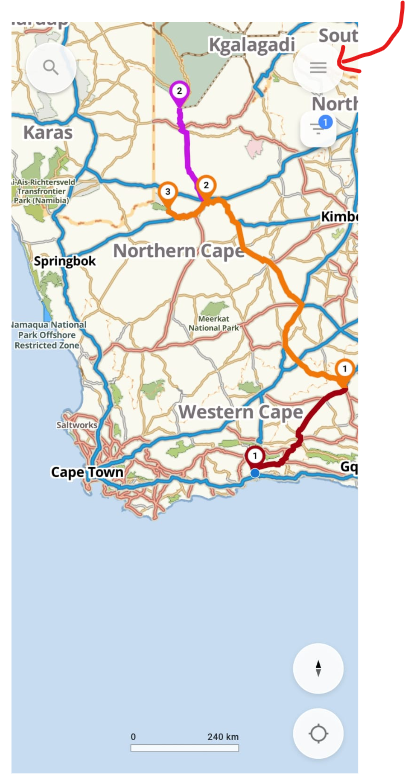
- Choose “Trips”
- Click on “Sync” in the top menu to sync your trips from the Trip Planner to the App
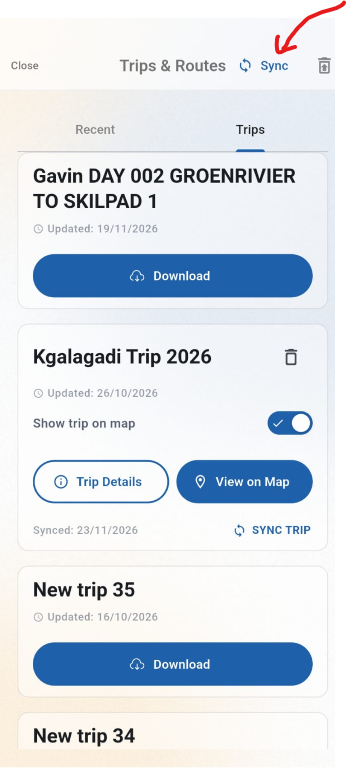
- Then your trips will appear.
- Tap on “Download” to download the trip to your App.
- Switch on the slider to “Show trip on map”
- Click on “View on Map” or Close the menu
- Your trip should be visible on the Apps Map.
Please refer to the following sections on our Trip Planner for guidance:


 Tracks4Africa